
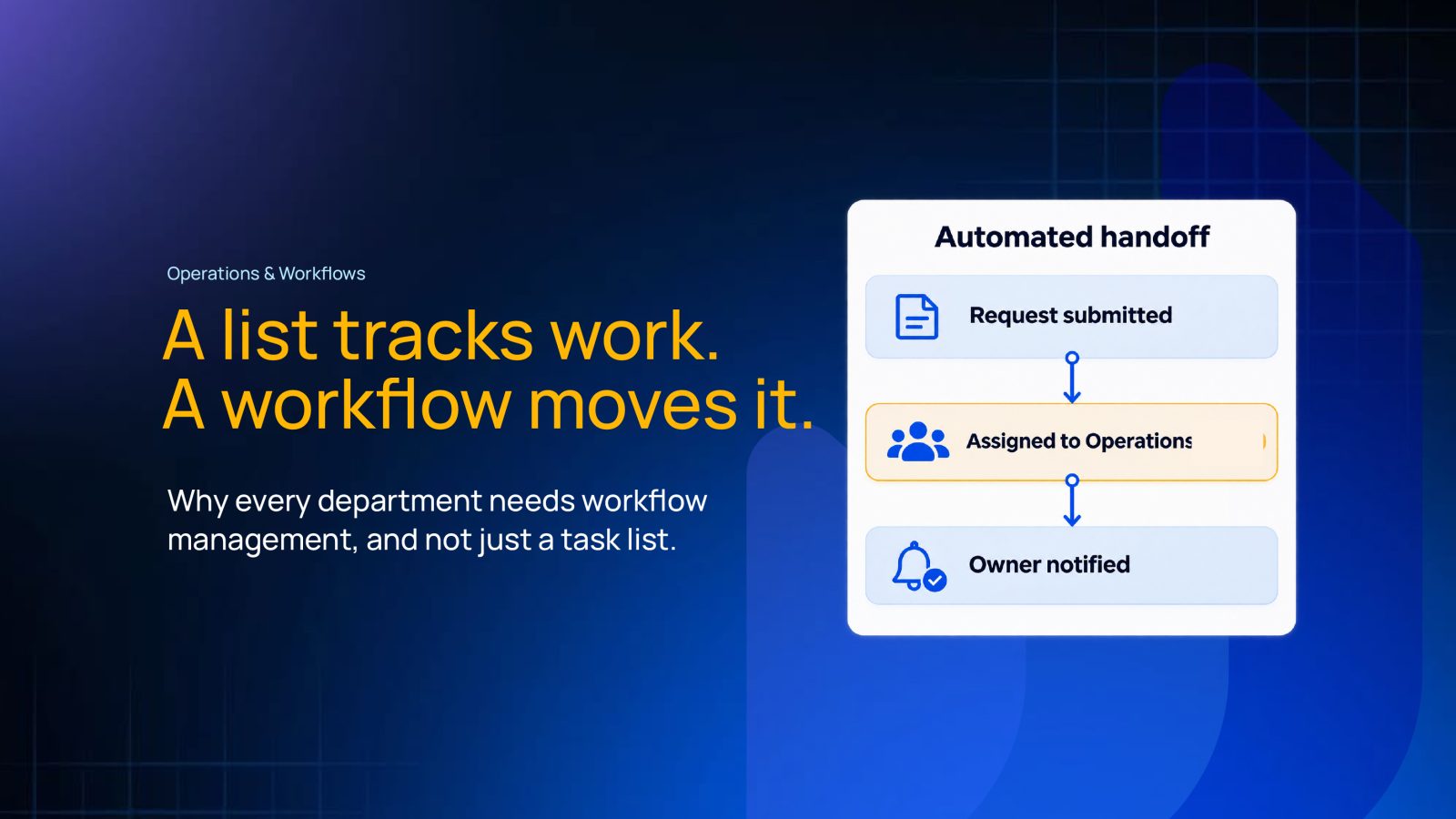
Growth is supposed to make a business run smoother. Often, it does the opposite.
A mid-sized distributor added six new sales reps in a single quarter. Leadership expected orders to close faster. Instead, things started to slip, one department at a time, and nobody could point to the exact day it began.
It started with a sales rep closing a deal and checking it off his own to-do list the same afternoon. Nobody on the warehouse side saw the order until he remembered to forward it, sometimes that day, sometimes two days later. The task existed. It was marked done. It just wasn’t moving.
That one gap spread beyond sales. In every other department, it showed up as what looked like a different, unrelated problem.
What a Task List Actually Does, and Where It Falls Short
A task list is one of the oldest productivity tools there is, and for good reason. It works. It helps a single person see what needs doing today, tick items off, and feel a small sense of progress by the end of the day.
For an individual, a task list does its job well. The trouble starts the moment work needs to leave one person’s list and land on someone else’s.
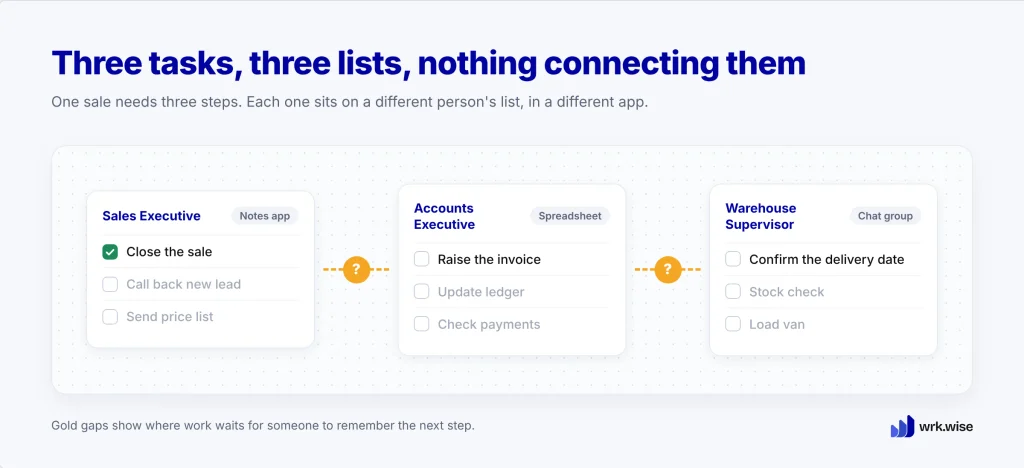
A task list has no idea what comes next. It doesn’t know that “close the sale” should lead to “raise the invoice,” and that “raise the invoice” should lead to “confirm the delivery date.” Each of those lives on a different person’s list, in a different app, sometimes only in someone’s head. Nothing connects them.
The Real Cost of Running Work Through “Just a List”
Back at the distributor, the unforwarded orders piled up fastest on Fridays. Reps closed out their week’s deals in a rush. The warehouse team, working off its own list, only found out about most of Friday’s orders on Monday morning.
That left a full weekend’s backlog with no extra warning. To hit dispatch deadlines anyway, the warehouse supervisor made a decision nobody above him approved: skip the second quality check on familiar, repeat-order products. His reasoning was simple. “We’ve shipped this exact order to this exact client a dozen times before.”
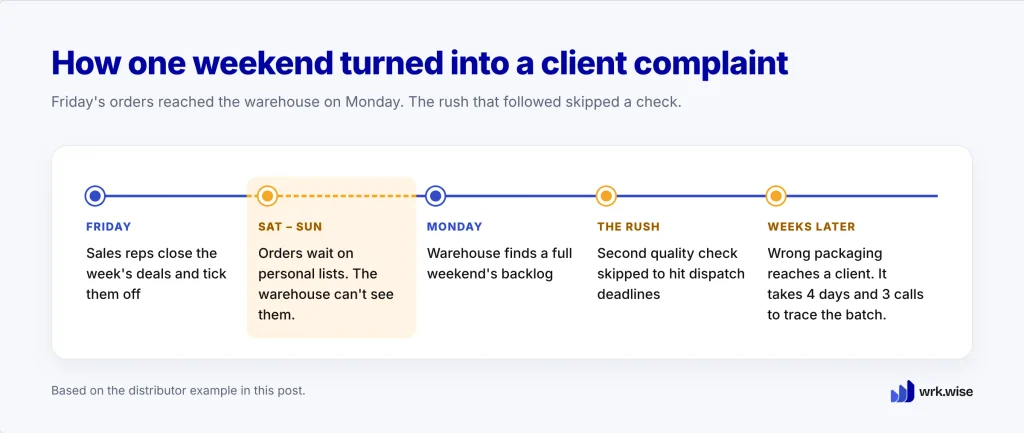
Most weeks, nothing went wrong. One week, a client received a batch with the wrong packaging variant, the exact mistake that second check existed to catch.
What upset the client most was how long it took to get answers. It took four days and three phone calls just to work out which week’s batch it was, because dispatch’s records and the client’s delivery date didn’t line up on anyone’s list.
Nobody in this story was careless. The sales rep closed his deals. The warehouse supervisor kept dispatch moving under real pressure. The task existed at every single step. The handoff between the steps didn’t.
Miro’s 2025 Momentum at Work Report found that 63% of knowledge workers say their information and data are spread across too many separate tools. About half (51%) say departments working in silos get in the way of real cross-functional collaboration.
The pattern behind both numbers is simple. Trouble starts the moment work has to cross from one team to another, and a personal task list can’t see across that line.
Three Signs You’ve Outgrown a Task List
1. Work gets marked “done” on one list and still doesn’t move. If a task is complete for the person who owns it, but the next person in line has no idea it’s ready, the list is doing exactly what it was built to do. Your business simply needs more than that.
2. Someone has to ask “where is this?” more than once a day. A task list can’t tell anyone but its owner where something stands. If checking status means a phone call, a WhatsApp message, or a walk to someone’s desk, the real status lives in a person’s head instead of the list.
3. A delay is only visible after it’s already a problem. Task lists show what’s pending, not what’s at risk. By the time a manager notices something is late, it’s usually already late enough to matter.
If more than one of these sounds familiar, your team’s effort is probably fine. The business has simply grown past what a personal list was meant to handle.
What Is Workflow Management?
Workflow management is the practice of defining how work actually moves from one person, step, or department to the next, not just what any single person needs to do. It covers who owns each step, what triggers the next one, who approves what, and what happens if something stalls.
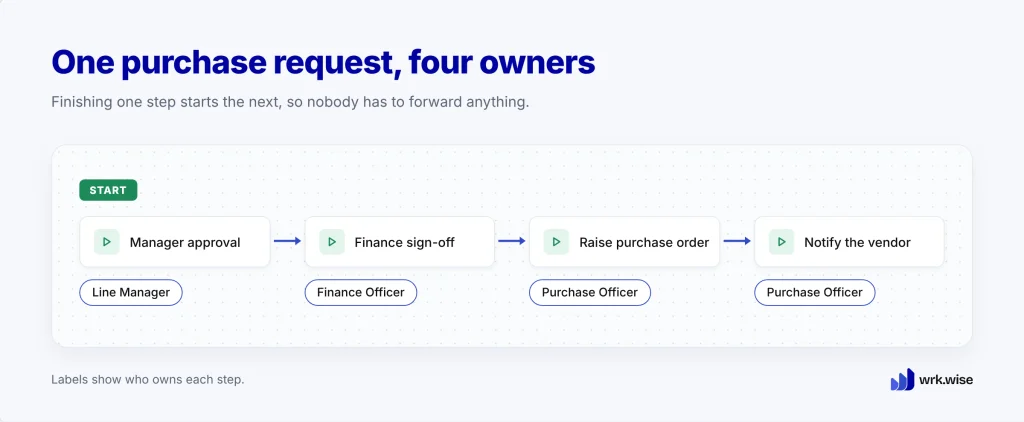
A simple example: a purchase request comes in. It needs a manager’s approval, then finance’s sign-off, then a purchase order, and then the vendor gets notified. That’s four steps and at least three different owners. A task list can hold four separate to-dos for four separate people. Workflow management connects them into one moving process, where finishing one step is what starts the next.
Task Management vs Workflow Management: What Is the Difference?
| Task Management | Workflow Management | |
| Unit of work | A single task, owned by one person | A multi-step process, owned by several people |
| Visibility | Visible to the task owner | Visible to everyone involved in the process |
| Handoffs | Not tracked; happen manually | Built in; one step triggers the next |
| Delay detection | Noticed only when someone asks | Visible as soon as work stalls past its deadline |
| Best suited for | Personal to-dos, individual workload | Cross-functional processes with dependencies |
The two work together. Task management helps one person organize their day. Workflow management helps a business organize how work passes from one person to the next. Most growing businesses have plenty of the first and almost none of the second.
What Workflow Management Adds Beyond a Task List
Workflow management adds four things a task list can’t give you: a clear owner at every step, not just the first one; a fixed order, so finishing one step starts the next; deadlines and reminders, so a stalled step gets noticed before it turns into a problem; and a shared view of the whole process for everyone involved, not only the person doing one task.
The work itself stays the same. What changes is that everyone can see how it moves, and that is often worth more.
The Same Breakdown, Department by Department
It’s tempting to think this is only an operations problem, since operations is usually where delays get noticed first. In practice, the same failure shows up in every department. It just looks a little different in each one.
One Business, Four Departments
Follow the distributor a little further. The same root failure shows up in four departments, and from inside each one, it looks like a separate problem.
Sales closes deals fast. Six new reps means six new streams of orders, each tracked on that rep’s own list, each considered “done” the moment the deal is signed.
Operations receives those orders in unpredictable batches and can’t see which ones are coming until they arrive. Under pressure to hit dispatch deadlines, a supervisor quietly skips the second quality check to keep the line moving. Nobody approved that shortcut, and nobody could see it happening in time to stop it.
Finance feels it next. Dispatch records and delivery confirmations don’t match, so an invoice sits unraised while the accounts team waits for information. That information exists, but nobody in finance can see it. Meanwhile, a client waits days for a simple answer about their own order.
HR faces its own version of the same gap. Six new sales reps in one quarter means six rounds of instructions to IT, admin, and the relevant department head: arrange a laptop, set up system access, and book the induction. Each of those tasks sits on someone else’s personal list, and no list says who should check that the other two got done. So one of the new reps arrives on her first day with no laptop and no system login. Three people each assumed someone else had it handled.
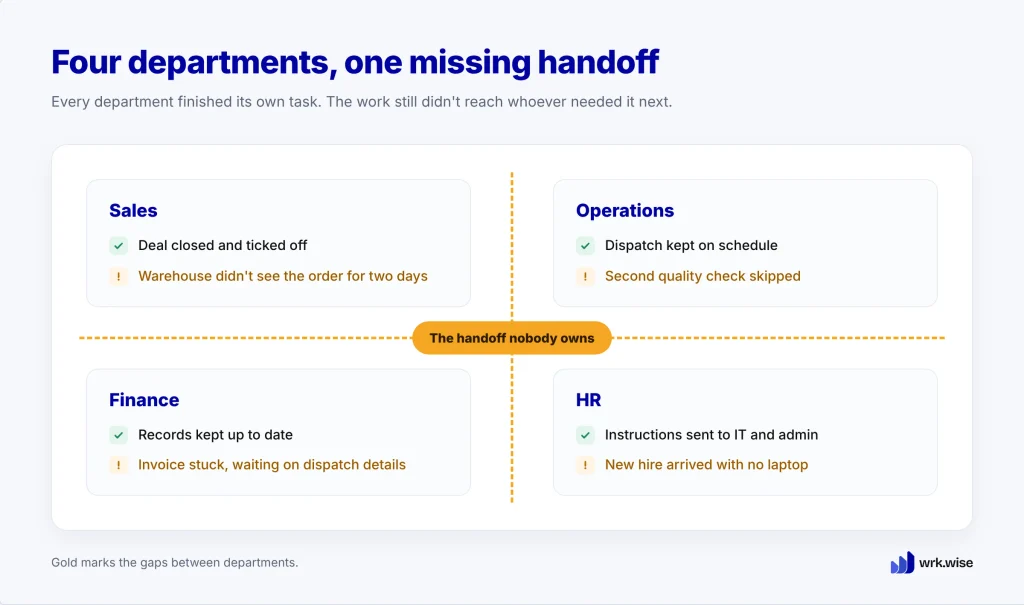
All four problems share one cause. In every case, the individual task got done, but the work never reached whoever needed it next.
Why Cross-Departmental Work Breaks Down First
Inside a single department, task lists often work well enough. People sit close together and report to the same manager, so someone usually notices when work stalls. That changes the moment work crosses a department line: sales to warehouse, warehouse to finance, HR to IT and admin. Suddenly, nobody is close enough to notice.
Nobody in sales was watching the warehouse’s list. Nobody in operations was watching finance’s inbox. Each department did its own tasks correctly and still ended up in the chain of failures above. The breakdown happened in the space between lists, where no one was looking.
This is why cross-departmental workflows are usually the first thing to break as a business adds people, customers, or departments. Think of the path from an order to its payment, from a job offer to a new hire’s first day, or from a request to its approval. No single task list was ever built to hold them.
What Workflow Management Looks Like in Practice
A Task Moving Through Ownership, Approval, and Completion
Picture the same distributor’s order moving through a defined workflow instead of four separate lists.
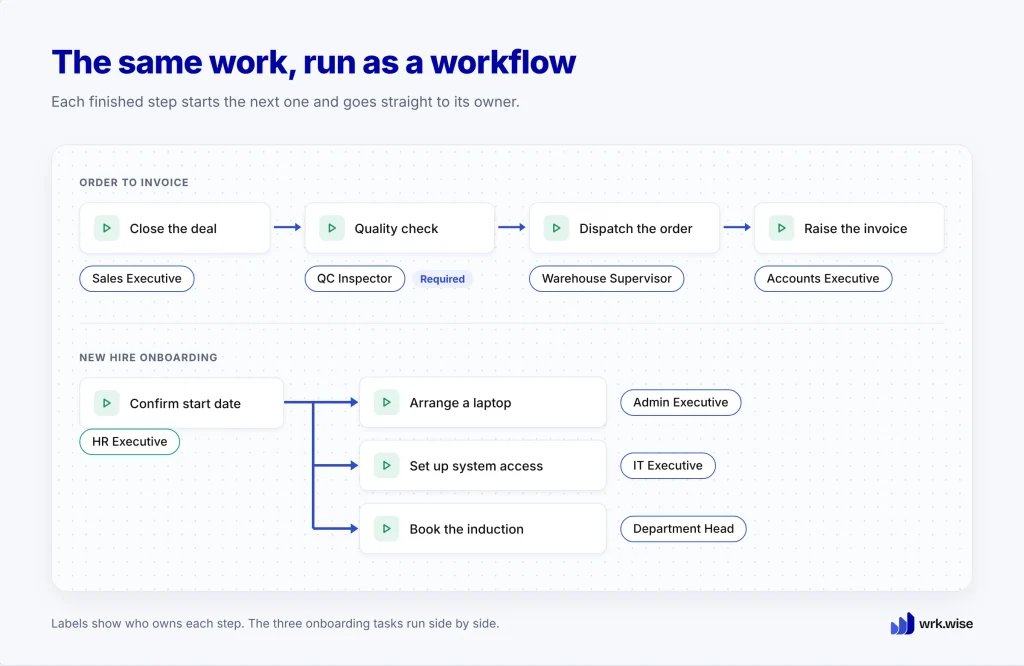
A sales rep closes a deal. That one action creates a task for the warehouse automatically, so there is nothing to forward and nothing to remember. The quality check is a required step, and dispatch can’t start until a named person marks it done. Once dispatch is confirmed, the work moves to finance, and the accounts team can raise the invoice the same day.
The onboarding version works the same way. A new hire’s start date creates three tasks that run side by side: the laptop, system access, and the induction. Each one has a named owner and a status that the HR manager, and everyone else involved, can see without asking. Nobody has to assume someone else has it handled.
At no point does anyone need to ask “where is this?” The process itself carries the answer.
What Changes When Every Department Runs on the Same System
The sales-to-warehouse gap, the skipped quality check, the stuck invoice, and the onboarding mix-up all trace back to the same pattern: a task that was complete by every individual measure but invisible to the next person who needed it.
When every department works in one shared workflow management system instead of separate personal lists, that gap closes. A finished step in one department becomes the starting point for the next. This is what workflow automation means in practice: nobody needs to remember to forward anything, because the system already knows what comes next and who owns it.
A List Tracks Work. A Workflow Moves It.
Look back at the distributor. Every person did their part. Sales closed the deals, the warehouse kept dispatch moving, and HR sent the right instructions to the right people. The business added six new reps and still slowed down, because work kept getting lost on its way from one person to the next.
A task list was never built to carry work across that gap. It tracks what one person needs to do and stops there.
A workflow picks up where the list stops. It moves work from person to person and department to department, so nobody has to remember to make the next call. If your teams spend more time chasing handoffs than doing the work, start small. Pick one process that crosses two departments and map who does what, in what order, and by when. That is usually where the gap is easiest to see.
FAQs
Can a small team get away with just a task list?
Often, yes, as long as everyone can see or ask about everyone else’s work without friction. The gap opens once headcount, customers, or departments grow past that point.
Does every department really need this, or just operations?
Every department that hands work to another department needs it. Operations notices first because delays there are the most visible.
Does this only happen in distribution and manufacturing businesses?
No. This piece uses a distributor because sales, operations, HR, and finance work closely together in one place. The same root cause shows up in hotels, logistics companies, law firms, and service businesses of every kind.
What’s the difference between a task and a workflow, in one sentence?
A task is one thing one person needs to do. A workflow is the path that task takes through everyone else it needs to pass to get finished.
How does wrk.wise help departments move from task lists to workflows?
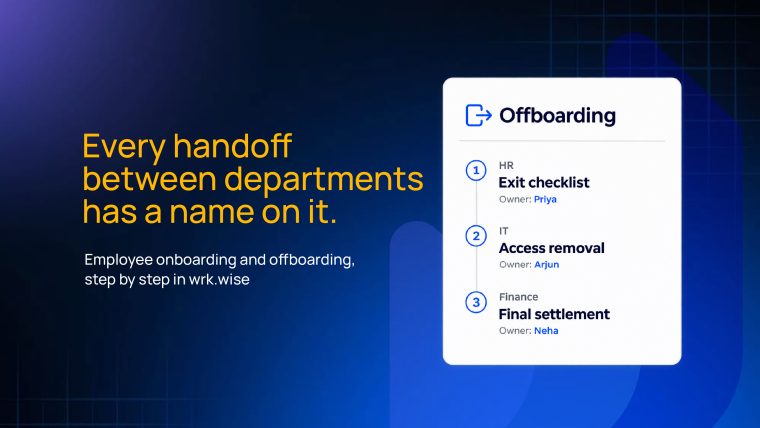
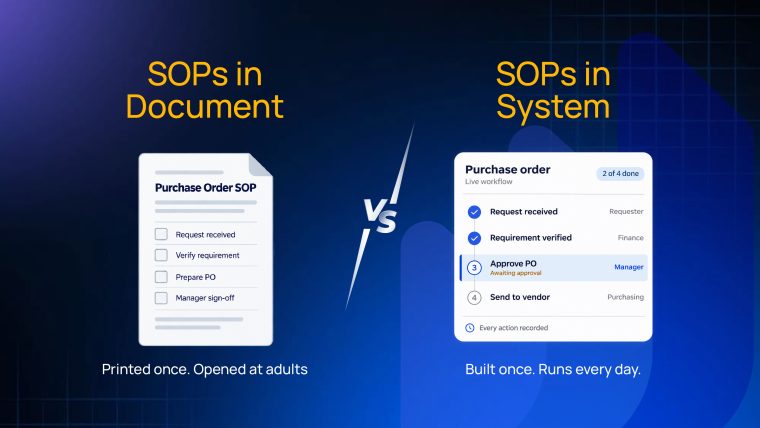
wrk.wise turns each process into an SOP (standard operating procedure): a set of steps, each with its own owner and deadline. A step can go to a named employee, a designation, or a whole department. When one step is done, wrk.wise assigns the next step to the right person automatically, so work moves between departments without anyone forwarding it. Anyone involved can open a task and see the whole process: which step it’s on, who has it, and when it’s due.

1 response
Comments are closed.