Divya was an Operations Executive at a 150-person logistics company in Bengaluru. She resigned, served her notice, and left on a Friday afternoon.
Three weeks later, her login to the dispatch software still worked. Her company laptop sat in a drawer at home, because nobody had asked for it back. Finance had put her final settlement on hold until someone confirmed her handover. And a regular client had sent two emails to her old address about a delayed shipment. Neither got a reply.
Nobody in this story ignored their job. HR accepted the resignation. IT was waiting for a request. Admin assumed HR would collect the laptop. Her manager thought a quick chat on her last day counted as a handover. Every department did its part, and the exit still never closed.
This is how the employee offboarding process breaks in most growing companies. Joining has the same gaps, only in the opposite direction. This guide shows where those gaps sit and walks through how to run both processes across every department in wrk.wise.
Why the Employee Offboarding Process Breaks Between Departments
Five Departments, No Single Owner
Every exit touches at least five parties: HR, IT, Admin, Finance and the employee’s line manager. Each one knows its own part well. What nobody owns is the whole exit, from the day HR accepts the resignation to the day Finance pays the final settlement.
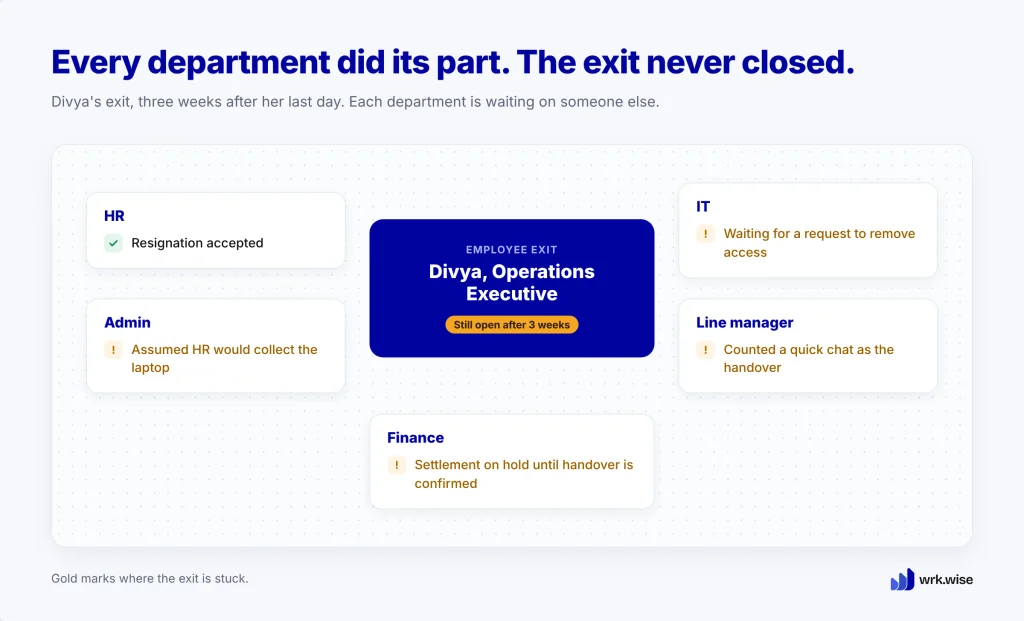
So the process lives wherever it can. Usually that means an HR Executive’s spreadsheet, a few chat groups and a lot of reminder calls. It holds up when exits are rare, and it falls apart when three people leave in the same month.
Four Gaps an Exit Leaves Behind
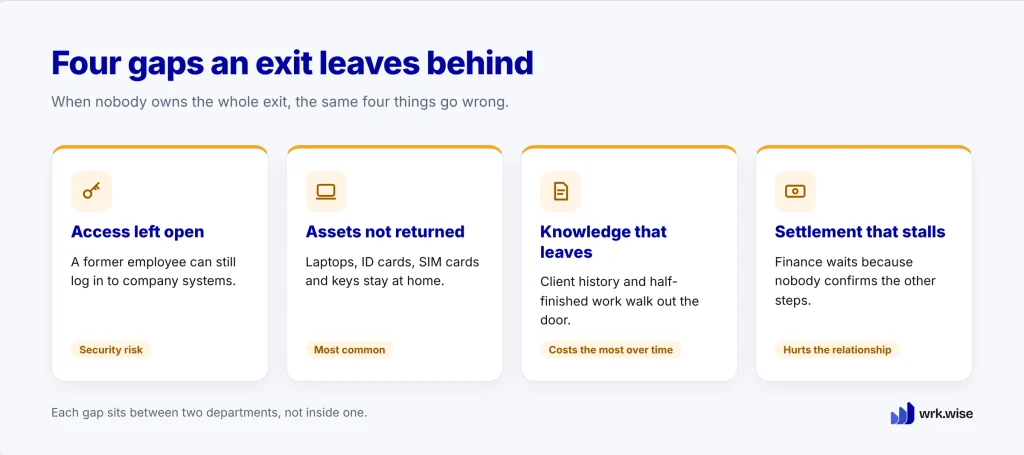
Access left open is the most serious gap. A former employee who can still log in to company systems is a security risk, even if they never use that access.
Assets that never come back are the most common. Laptops, ID cards, SIM cards and keys stay with people because nobody asked for them on the right day.
Knowledge that leaves with the person costs the most over time. Client history and half-finished work walk out the door unless someone writes them down. Expertise in one head is a risk. Expertise in a process is an asset.
Final settlements that stall hurt the relationship last. Finance can’t pay until every other step is done, and nobody tells Finance when that happens.
Offboarding and Onboarding Are Mirror Images
What Each Department Does When an Employee Joins and Leaves
A good offboarding checklist covers the same ground as onboarding, in reverse. The same five departments do the work, and only the direction changes.
| Department | When an employee joins | When an employee leaves |
| HR | Offer letter, documents, employee record | Accept resignation, exit interview, relieving letter |
| IT | Email, system logins, software access | Remove access, back up data |
| Admin | Laptop, ID card, desk | Collect laptop, ID card and keys |
| Finance | Salary account and payroll details | Final settlement, clear advances |
| Line manager | Induction plan, first-week tasks | Knowledge handover, reassign open work |
Because the same people are involved at both ends, the same gaps appear at both ends. A step missed on the way in and a step missed on the way out usually belong to the same department.
How wrk.wise Runs an Employee Exit, Step by Step
Let’s run Divya’s exit again, this time in wrk.wise. If you’re new to SOPs in wrk.wise, our guide to SOPs in the workplace covers the basics.
Build the Offboarding SOP Once
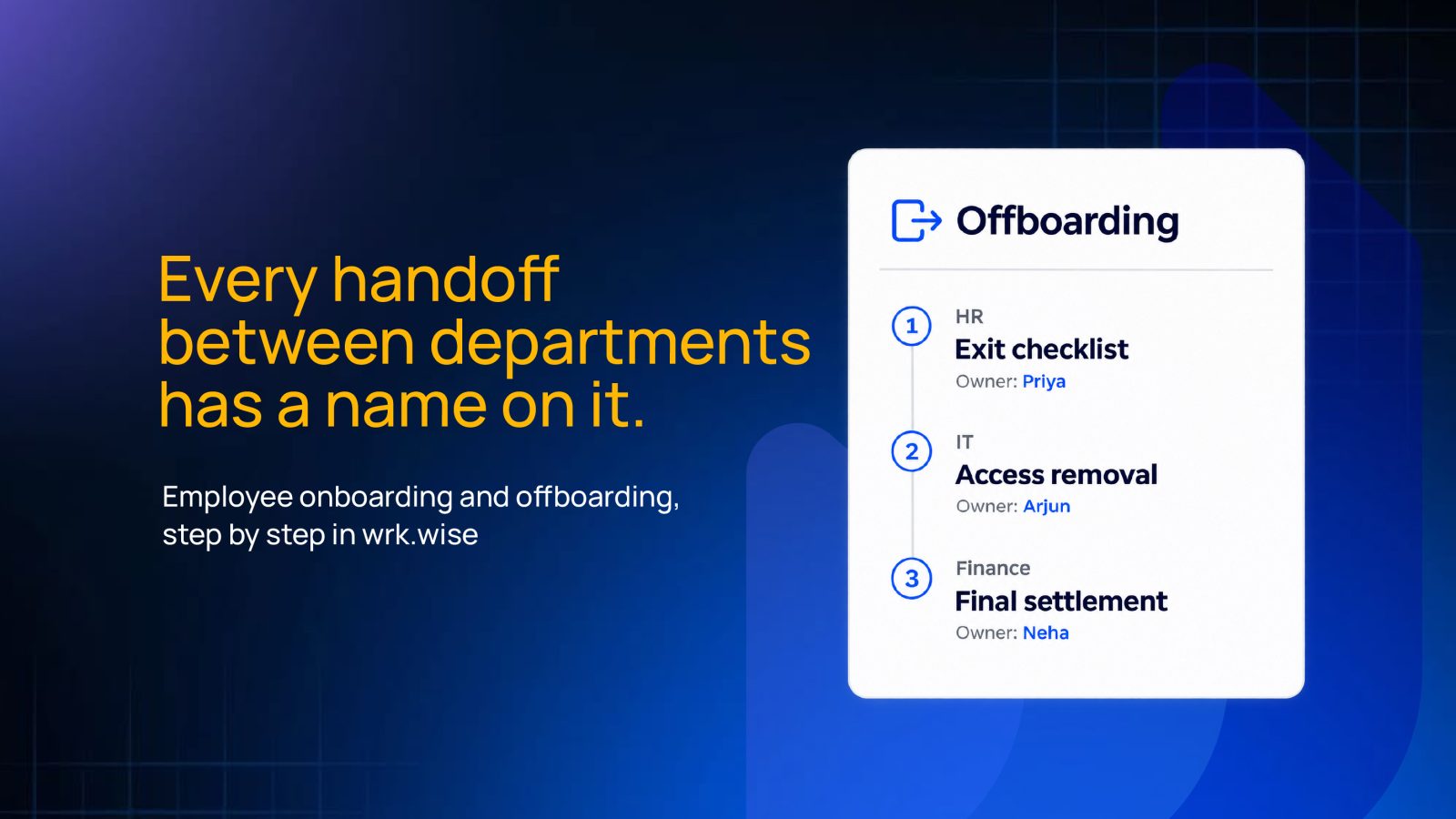
An SOP (standard operating procedure) in wrk.wise is a set of steps, each with an owner and a deadline. You build it once in the workflow builder, and every exit after that follows it.
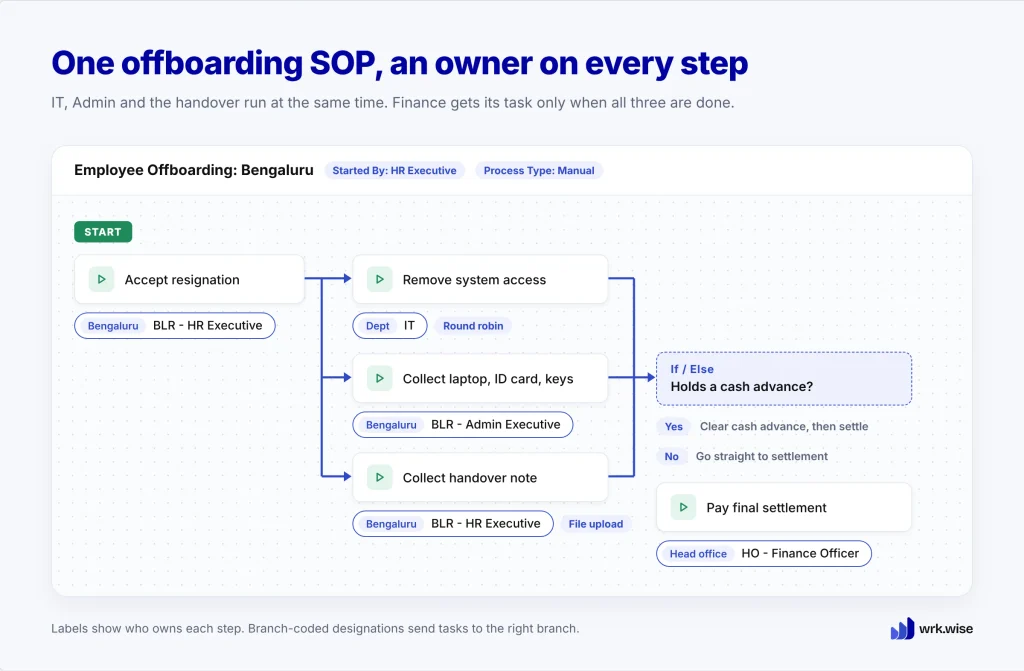
Each step goes to a designation or a department instead of a named person. “IT Executive removes system access” stays correct even after your IT Executive changes. If a step goes to the whole IT department, wrk.wise hands it to one person, either in turn or to whoever has the least work.
Steps can also collect proof. Admin ticks a checkbox for each returned asset, and the handover note arrives as a file upload. Under “Started By,” you choose the HR Executive designation, so HR is the one who starts every exit.
If you run several branches, one SOP can serve all of them. Branch-coded designations, such as “BLR – Admin Executive,” send each task to people at the right branch.
Image: Product screenshot of the offboarding SOP in the workflow builder, with designation tags on each step. Alt text: Employee offboarding SOP in the wrk.wise workflow builder with an owner on every step.
HR Starts the Exit and Every Department Gets Its Task
When Divya’s resignation is accepted, the HR Executive opens wrk.wise, clicks Start Process and picks the offboarding SOP.
The flow then splits. IT, Admin and the handover step all get their tasks at the same time, so nobody waits for anybody else. Each person sees the task in My Tasks, on a computer or the mobile app, with the deadline and the form already set. wrk.wise sends a reminder before each deadline.
The Line Manager’s Handover Arrives as a Delegated Task
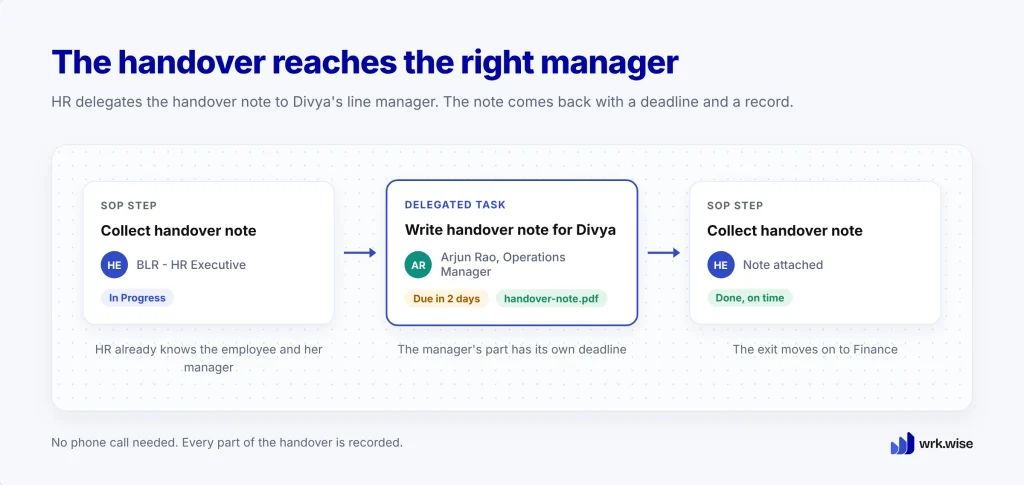
The handover needs Divya’s own line manager, and that person is different for every exit. So the SOP gives the handover step to the HR Executive, who already knows the employee and her manager.
From that step, HR creates a delegated task in wrk.wise for Divya’s line manager, with its own deadline. The manager writes the handover note and attaches it to the task. HR then adds the note to the SOP step and marks it done.
Nothing here depends on a phone call. The manager’s part has a deadline and a record, like every other step in the exit.
Finance Settles Only After Access Is Closed and Assets Are Back
After the parallel steps, the flow merges. The final settlement task reaches the Finance Officer only when IT, Admin and the handover are all complete. Finance never has to ask whether it’s safe to pay.
Some exits need extra steps. An If/Else rule can check one answer on the form, such as whether the employee holds a cash advance, and add a “Clear cash advance” step only when the answer is yes.
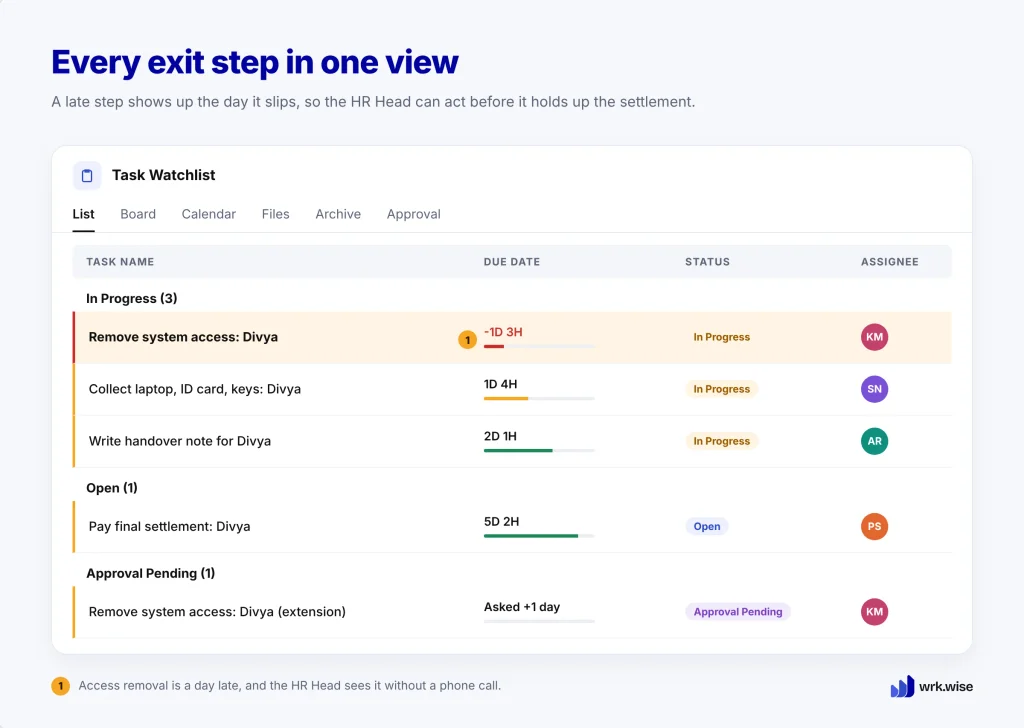
Anyone involved can open the task and see the whole exit: which step it’s on, who has it and when it’s due. The HR Head can follow every exit on the Task Watchlist and spot a late step the day it slips. If someone needs more time, they request an extension with a reason, and their manager approves it.
Image: Product screenshot of the Task Watchlist with one exit step running late. Alt text: wrk.wise Task Watchlist showing an employee offboarding step past its deadline.
What Each Exit Leaves Behind, and Where wrk.wise Stops
Every completed step is recorded against its deadline, showing who did it and when. HR gets a clean record of each exit. Those records also count toward the appraisals of the people doing the work, so the IT Executive who closes access on time gets credit for it.
wrk.wise has limits worth knowing before you start. It doesn’t remove system access or run payroll by itself. It sends those tasks to the right people, keeps them in the right order and records when they’re done.
The Employee Onboarding Workflow Runs the Same Way
The onboarding SOP mirrors the exit. HR starts it when a candidate accepts the offer and creates the employee record first, because IT needs it to set up email and system access.
After that, the flow splits. IT prepares access, Admin arranges the laptop, ID card and desk, and HR delegates the induction plan to the new hire’s line manager. When those tasks are complete, the first-week tasks begin. (For what happens on day one when this goes wrong, read 5 Signs Your Business Needs Workflow Automation.)
Where to Start: Build Your Offboarding SOP First
Start with offboarding. It carries more risk, and it usually has fewer steps, so you can build it faster.
Sit down with one person each from HR, IT, Admin, Finance and a line manager. Agree on the steps, who owns each one and a deadline for each. Then build the SOP in wrk.wise from what you agreed. There are no ready-made templates, so the SOP follows how your company already works.
Keep onboarding as a separate SOP, since two small SOPs are easier to follow and fix than one large one. After the first few exits, check where tasks got stuck and adjust the steps.
FAQs
Our HR software already has an onboarding checklist. Why use wrk.wise?
A checklist inside HR software usually stays with HR. In wrk.wise, onboarding and offboarding run like any other process that crosses departments. Each step goes straight to its owner in IT, Admin or Finance, the next step starts on its own, and every completed step is recorded for appraisals. Your HR software can keep handling payroll and attendance.
Does wrk.wise remove system access automatically?
No. wrk.wise assigns the task to your IT team with a deadline, reminds them before it’s due and records when it’s done. The final settlement can’t start until that step is complete.
What happens when a step in the offboarding process runs late?
The owner gets a reminder before the deadline. If the step still slips, the delay shows on the Task Watchlist of the people following that exit. Asking for more time needs a reason and an approval, so every delay is explained.
Do we need a template to get started?
No. You build each SOP from the steps your team already follows, then improve it after the first few exits.