
Ask someone to bake a cake without a recipe. They will make something. Maybe too much sugar. Maybe the wrong baking time. Maybe no frosting at all.
Now give them a recipe, but lock it in a drawer while they bake. You get the same cake.
That is how most businesses treat SOPs. The procedures exist, but they sit in PDFs and folders. People open them during audits and training. Daily work still runs on memory, WhatsApp messages, and managers asking for updates.
This guide explains what SOPs in the workplace are, why they fail, and five steps to turn them into daily execution.
What Is an SOP in the Workplace?
A Standard Operating Procedure (SOP) is a set of steps for work that repeats. It makes sure the work gets done the same way, to the same standard, every time.
A good SOP answers five questions:
- What needs to be done?
- Who owns each step?
- How should it be done?
- When is it due?
- What result or record should it create?
In this guide, we use one example most businesses know well: purchase request approval.
SOP vs Policy vs Process vs Procedure
These terms sound similar, but each one does a different job.
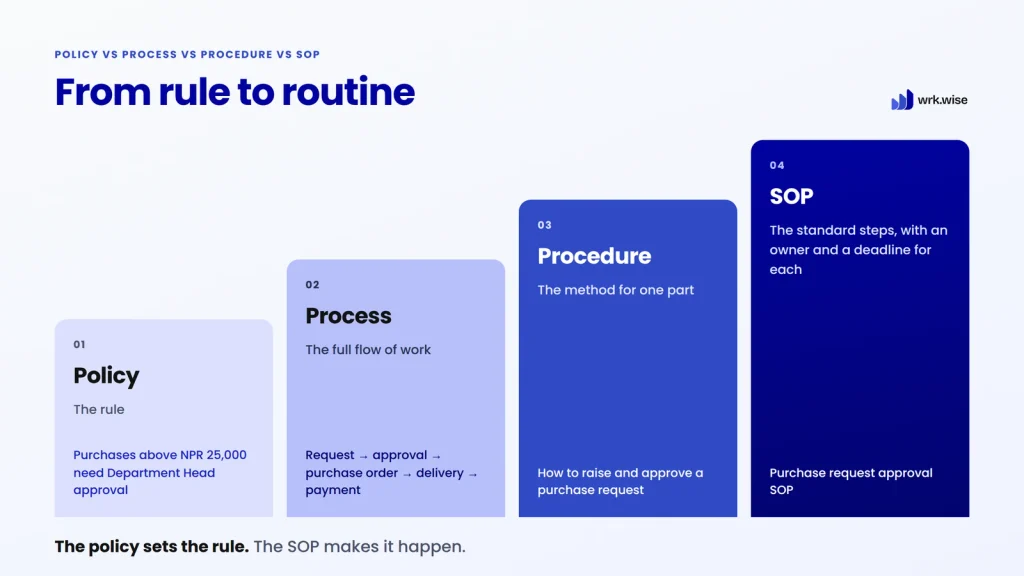
| Term | What it means | Purchase approval example |
| Policy | The rule | Purchases above NPR 25,000 need Department Head approval |
| Process | The full flow of work | Request → approval → purchase order → delivery → payment |
| Procedure | The method for one part of the flow | How to raise and approve a purchase request |
| SOP | The standard steps for repeated work, with owners and deadlines | Purchase request approval SOP |
The policy sets the rule. The SOP makes the rule happen. Without an SOP, nobody knows who checks the request, who approves it, or where the record goes.
Why SOPs Matter: 4 Key Benefits
1. Consistent Work Across Teams
Every purchase request follows the same path, no matter who handles it. That means fewer errors and fewer surprises.
2. Less Dependency on Key People
Many businesses rely on one or two people who “just know how things work.” When they go on leave, work stops. An SOP turns their personal knowledge into shared business knowledge.
3. Fewer Follow-Ups for Managers
When work is unclear, managers become the reminder system. A clear SOP defines the flow in advance, so managers can stop chasing and start solving real problems.
4. Faster Onboarding and Easier Growth
New hires learn from a clear process instead of asking five colleagues. And as the team grows, the same process works without the owner supervising every step.
Why SOPs Fail in Most Businesses
In most businesses, the problem is not missing SOPs. The problem is SOPs that never become part of daily work. Here is where they break.
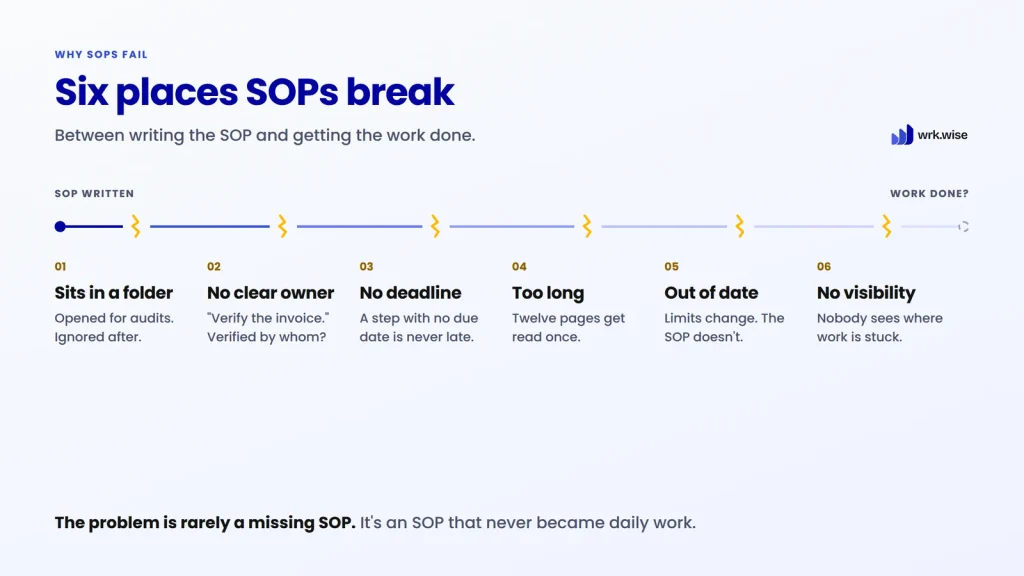
They Sit in Folders
Someone writes the SOP for an audit or a consulting project. Then it goes into a folder. The team keeps working from habit and chat messages.
They Have No Clear Owner
“Verify the invoice before payment.” Verified by whom? Accounts, procurement, or the store? If the SOP does not say, the task waits.
They Have No Deadlines
If an approval should take 24 hours, someone needs to see that deadline. Without one, a step can never be late, so nobody notices when it is.
They Are Too Long
A twelve-page SOP that covers every exception gets read once and forgotten. Short SOPs get used.
They Go Out of Date
Approval limits change. Teams change. When the SOP stops matching reality, people stop trusting it.
Nobody Can See If They Work
A document cannot show where work is stuck or which step keeps slowing things down. Every delay stays hidden until it becomes a problem. (Related: The Hidden Costs of Manual Processes.)
Know a manager who spends the day chasing approvals? Send them this guide.
How to Implement SOPs in the Workplace: 5 Steps
These steps work with any tool, even paper. Start small and build from there.
Step 1: Pick One Repeated Process
Choose a process that happens every week and causes trouble when it breaks. Purchase approval is a good place to start.
Step 2: Keep the SOP Small
One SOP, one purpose. Keep “raise and approve a purchase request” separate from “receive goods and pay the vendor.” Small SOPs are easier to follow, fix, and reuse.
Each SOP needs only six things: a trigger, the steps, an owner for each step, a deadline, what to do in exceptions, and the final output.
Step 3: Assign Every Step to a Role, Not a Person
People join and leave. Roles stay. Write “Procurement Executive raises the request,” not a colleague’s name.
You can also assign a step to a department. That works, as long as each task still lands with one person. “The team” cannot own anything.

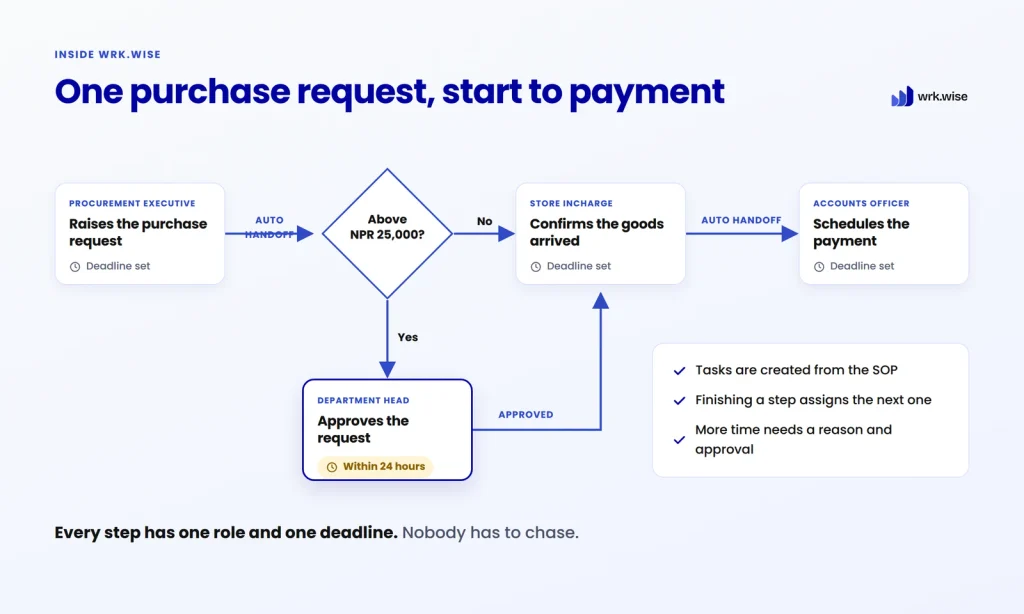
For purchase approval, ownership looks like this:
- Procurement Executive raises the purchase request.
- Department Head approves requests above NPR 25,000.
- Store Incharge confirms the goods arrived.
- Accounts Officer schedules the payment.
Step 4: Give Every Step a Trigger and a Deadline
Each step needs a clear start and a due time. For example: “Department Head approves within 24 hours of the request.” Now a delay is visible the moment it happens.
Step 5: Review After 30 Days
Check where tasks got stuck, which deadlines slipped, and which steps people skipped. Fix the SOP. After that, review core SOPs every 6 to 12 months.
You can do all five steps with documents and reminders. But every handoff still depends on someone remembering. That is the gap a workflow system fills. (Not sure you need one yet? Read 5 Signs Your Business Needs Workflow Automation.)
How wrk.wise Turns SOPs Into Live Workflows
Earlier, we saw where SOPs break. Now let’s follow one purchase request through a working week and see what changes when the SOP runs inside wrk.wise.
Start Any SOP in One Click
Monday, 9:00 AM. The design team needs a new laptop. The Procurement Executive doesn’t hunt for a form or send a message to ask what to do. They open wrk.wise, click Start Process, and pick the Purchase Approval SOP.
That click is the only manual step. wrk.wise creates the first task with the owner, the deadline, and the form already set. The Procurement Executive fills in the details and attaches the quotation. The record now lives with the task, not on someone’s phone.
Behind that click is an SOP someone built once. Each step belongs to an employee, designation, or department. So, when someone takes leave or a new person joins, the process keeps running.
Route Every Step to the Right Owner Automatically
Monday, 11:00 AM. The Procurement Executive submits the request, and the next task goes straight to the next owner. No message. No reminder.
An If/Else rule checks the amount. Requests that need approval go to the Department Head, and smaller ones move straight ahead. This laptop needs approval, so it lands with the Department Head, with the quotation already attached.
Spot Delays Before Deadlines Are Missed
Thursday, 10:00 AM. Remember the approval that was due in 24 hours and quietly slipped to day four? This is where that story changes.
The laptop has arrived. The Store Incharge now has a task to confirm it, due today. Their line manager opens the Task Watchlist, which shows every active task their team is working on. It also shows tasks the manager follows as a consultant, tasks they chose to be notified about, and any task where someone mentioned them in a comment.
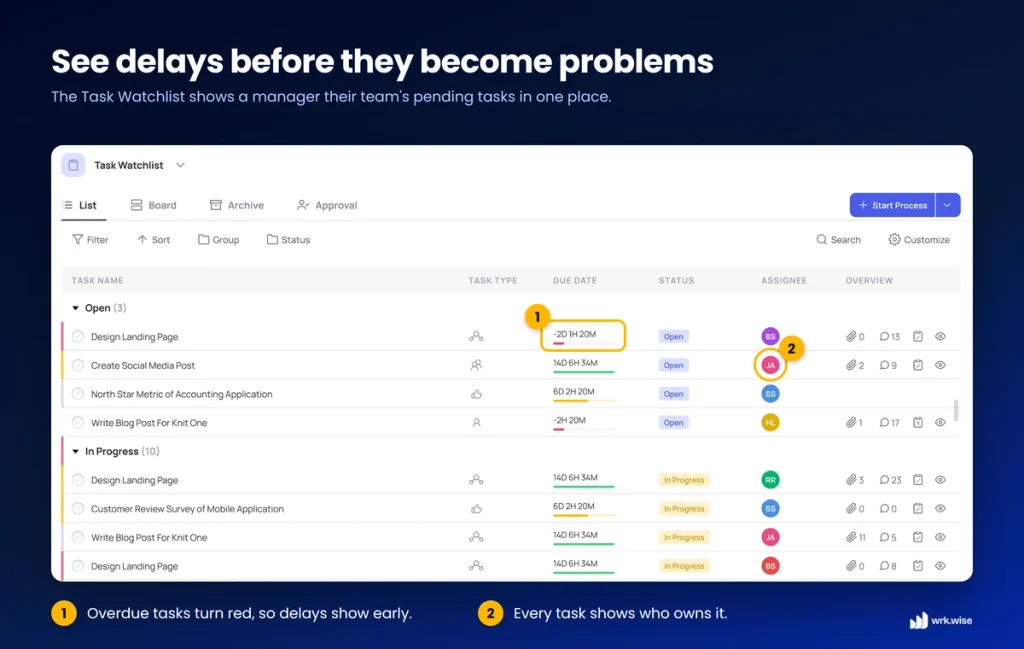
Each task has a live countdown. The bar is green while there’s time, turns yellow as the deadline gets close, and turns red once it has passed. The manager spots the yellow bar, opens the task, and leaves a comment asking if anything is blocking it. The manager can follow along, comment, and add files, but can’t change the task. The owner stays the owner.
If the Store Incharge needs more time, they request an extension with a reason, and their manager approves it. Every extension is explained, and the manager sees the risk while there’s still time to act. Instead of fighting the fire, they can stop it from starting.
Turn Daily SOP Work Into Fairer Appraisals
Six months later. Normally, a manager tries to remember a year of work and ends up rating the last few weeks. This time, the record is already there.
Completed SOP tasks count toward each employee’s appraisal. Late work scores lower, based on marking rules you set. Harder steps can carry more weight than simple ones. You also decide how much the final score depends on SOP work, delegated tasks, and feedback.
Managers still make the final judgment. But they make it with a record of real work, not memory. And if you run more than one branch, every sub-company can use the same SOP. The same week plays out the same way everywhere.
Paper SOPs vs SOP Software: A Quick Comparison
| Paper or PDF SOP | SOP in wrk.wise | |
| Starting the process | Find the form, send a message | Click Start Process |
| Who does the work | Whoever remembers | A set role, every time |
| Next step | Someone passes it on | Assigned automatically |
| Records | Scattered in chats and folders | Attached to each task |
| Manager’s view | Asking for updates | Task Watchlist with live countdowns |
| Deadlines | Written, not tracked | Tracked, with approval to extend |
| Multiple branches | Each branch does it differently | One SOP, used everywhere |
| Appraisal | Not connected | Real work, scored by your rules |
SOPs Only Work When They Become Daily Work
SOPs in the workplace create consistency and protect business knowledge. But a document cannot assign work, track deadlines, or show delays on its own.
Start with one process. Keep it small. Give every step an owner and a deadline. Then let a system run it, so your team knows what to do and you can stop chasing.
FAQs About SOPs in the Workplace
What is the main purpose of an SOP?
An SOP creates a clear, repeatable way to complete work. It helps every team member follow the same steps and reach the same standard.
How do you implement SOPs in the workplace?
Start with one repeated process. Keep the SOP small, assign each step to a role, and give each step a deadline. Review it after 30 days and improve it.
How often should SOPs be reviewed?
Review core SOPs every 6 to 12 months. Review high-risk or fast-changing processes more often.
Why do SOPs fail?
SOPs fail when they sit unused in folders, have no clear owner or deadline, run too long, or go out of date. They also fail when nobody can see whether they are being followed.
What should SOP software do?
Good SOP software turns procedures into tasks. It should assign owners, track deadlines, handle approvals, and show managers where work is stuck.