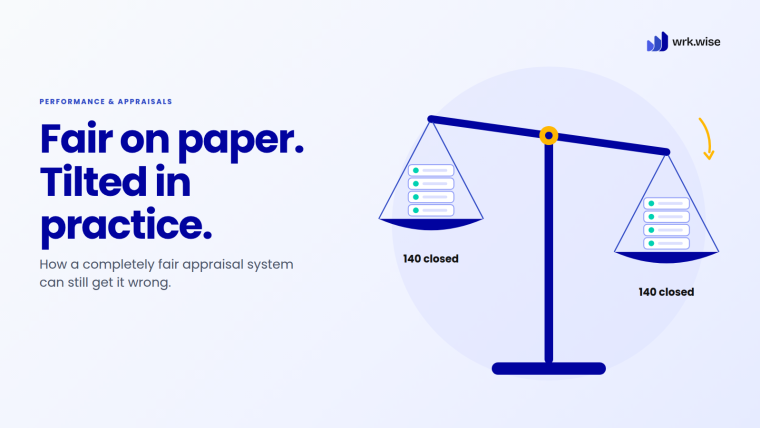

A few months into growth, many business owners notice the same pattern. The team is busy. Managers are busy. Everyone is working. Yet progress feels slower than it should.
Approvals take longer than expected. Simple requests need three follow-ups. Work moves through emails, WhatsApp groups, spreadsheets and paper registers, but no one has one clear view of what is actually happening.
The first thought is usually, “Maybe we need more people.” Sometimes that’s true. But often, the real issue is not a lack of people. It is a workflow problem.
When work depends on memory, manual data entry, verbal updates and personal habits, daily operations get harder to control. Your team may be capable. The system around them may not be.
That is where workflow automation helps. It turns repeated tasks, approvals and handovers into a defined flow, so work moves forward without someone chasing it. Your team gets its time back for the decisions that need real judgment.
Meet Swadmala Foods: One Business, Five Signs
To show what this looks like in real life, we’ll follow one business through all five signs.
Swadmala Foods is a family-owned namkeen and snacks maker in Ahmedabad. Rajesh Patel founded it, and today it sells through distributors across Gujarat and Maharashtra. A year ago, it had 45 employees. Today, it has almost 70. Rajesh still signs off on most decisions himself.
His son Karan joined the business two years ago after his MBA. He can see the cracks, but he also knows the old way built the company. He isn’t trying to tear it down. He wants it to run without his father holding every thread.
Swadmala Foods is a fictional company. Its problems are not. Every situation below is the kind that growing businesses across India run into every week.
First, When You Really Do Need More People
Not every slowdown is a workflow problem. If your team is fully booked on skilled work, like producing, selling or serving customers, and demand keeps rising, you may simply need more hands. Automation won’t fix that.
The test is where the time goes. If people are busy doing the work, hire. If they are busy chasing, reminding, re-typing and waiting, fix the workflow first. Hiring into a broken workflow only gives you more people to chase.
Here are the five signs that point to the workflow.
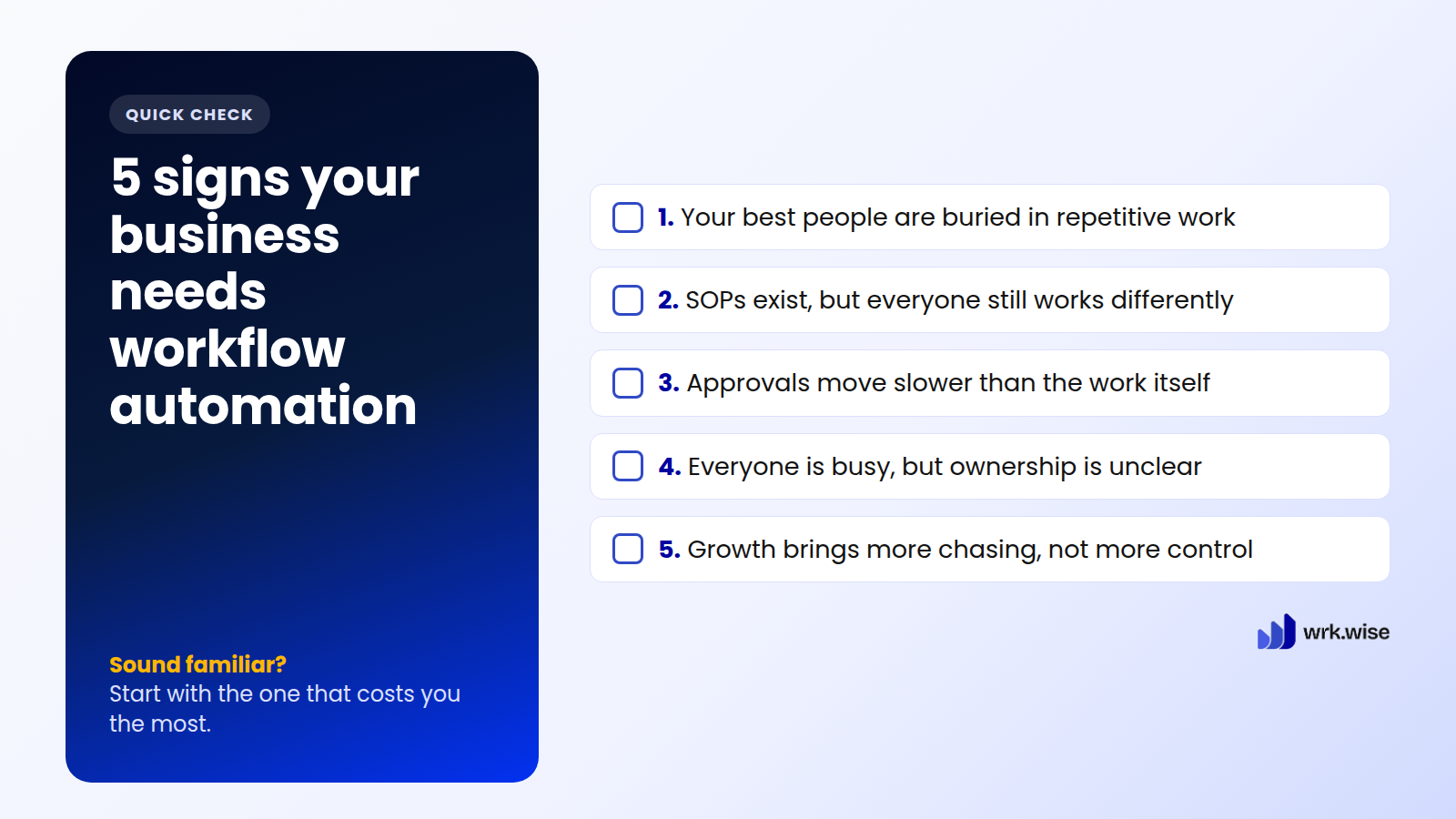
1. Your Best People Are Buried in Repetitive Work
Some of the most expensive hours in a business go into work that needs no skill at all. Typing the same numbers again. Sending the same reminders. Making the same phone calls. It looks small on any single day. Across a whole team and a whole month, it adds up fast.
At Swadmala Foods, Anjali is the sales coordinator. She is good at her job. She knows every distributor by name, and she can spot a slow-moving product before anyone else.
But her first hour every morning goes to one thing. She calls the three warehouse supervisors for yesterday’s dispatch numbers and closing stock. One answers. One says he’ll call back. One sends a photo of his handwritten register. She types it all into a spreadsheet, formats it the way Rajesh likes, and sends it to him on WhatsApp.
Around 11, Rajesh replies with a question about one product. Anjali calls the warehouse again.
Every day, the person with the best feel for the market spends her morning as a data collector.

Automate that one report, and her morning changes. Each supervisor gets a short daily task: enter dispatches and closing stock in a simple form. If a form isn’t filled on time, a reminder goes out by itself. The numbers land in one place, in the same format, every day. Anjali stops collecting numbers and starts reading them.
This is what workflow automation does best. Reminders trigger on their own. Data gets entered once, at the source. Skilled people get their time back for skilled work. That is the first step toward Business on Autopilot.
2. SOPs Exist, But Everyone Still Works Differently
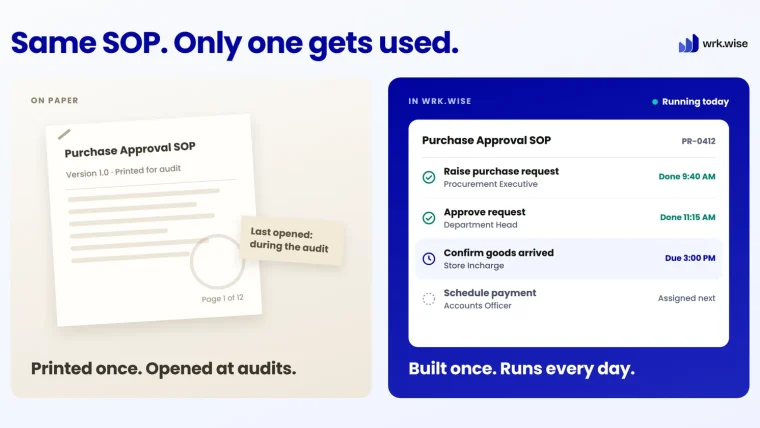
Many businesses already have SOPs. They sit in process documents, training files, PDF manuals, folders and paper checklists.
On paper, the process looks clear. In daily work, everyone does it differently. One person follows the written SOP. Another follows what their last manager taught them. This gap has nothing to do with careless people. It exists because the process doesn’t live inside the daily work. It lives in a folder.
Swadmala Foods has a written dispatch checklist: verify quantity, check packaging, confirm the vehicle, update the register. But its three shift supervisors run it three different ways. One skips the register update because “the driver already confirmed verbally.” Another checks packaging last instead of first. Most days, it doesn’t matter.
Then comes the end-of-month rush. Two shipments go out back to back, and one leaves two cartons short. Nobody can say which step was skipped, or on whose shift, because there is no record of which version of the process ran that day. The short-shipped distributor calls Rajesh directly. The warehouse spends the next morning re-counting stock instead of preparing the next dispatch.
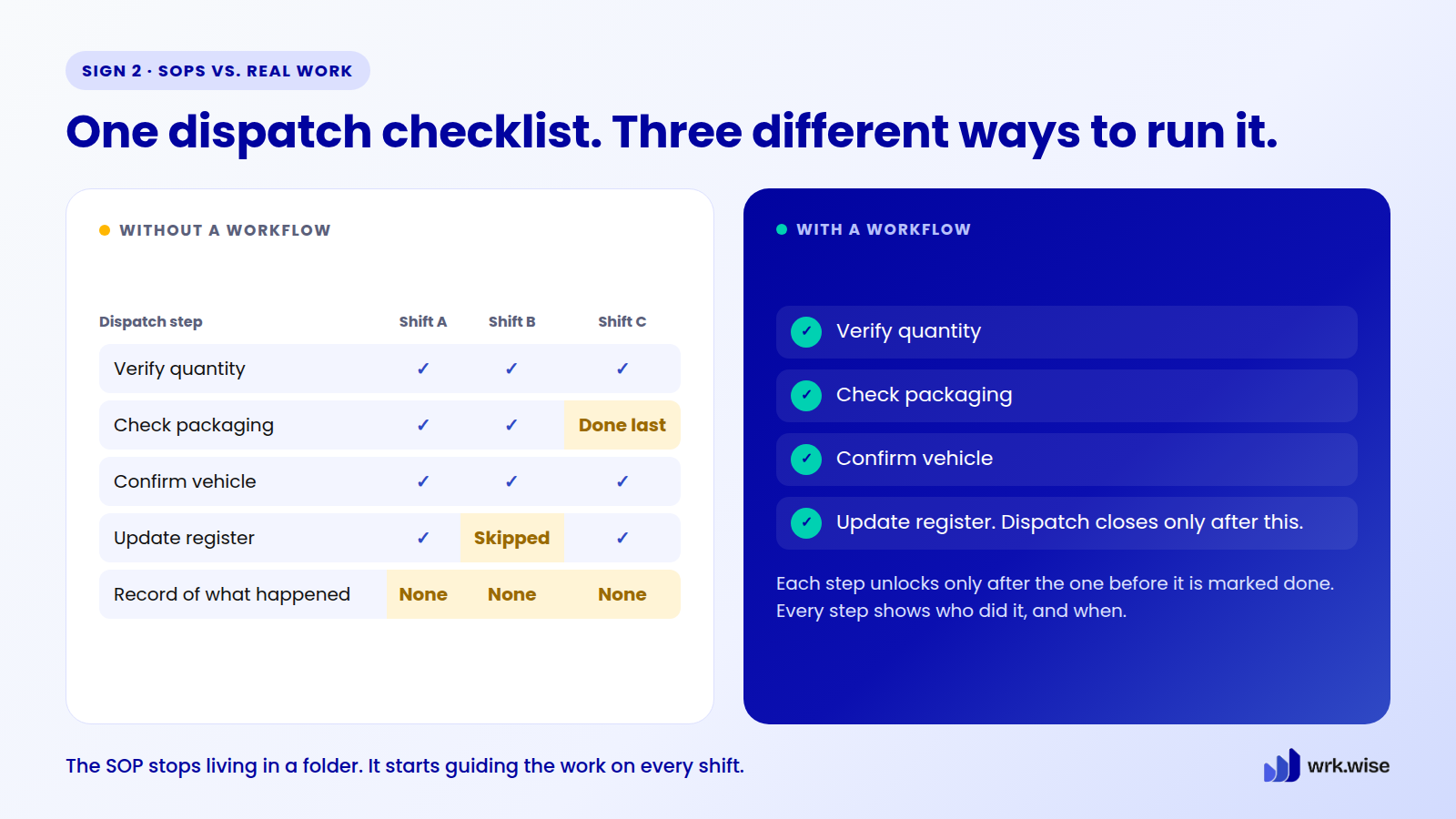
Build the checklist into the workflow, and this changes. Each step must be completed and marked before the next one unlocks, no matter which supervisor is on shift. When something goes wrong, there is a record of exactly which step was missed and by whom. No guessing.
That is the difference SOP automation makes. Instead of storing the SOP somewhere and hoping people follow it, the workflow guides the work. Tasks are created from defined steps, each step has a clear owner, and the right people can see the status.
3. Approvals Move Slower Than the Work Itself
Here is a simple test. If an approval takes longer than the work it approves, the approval path is the problem.
A document is ready, but it is waiting for a signature. A leave request is submitted, but HR and the manager aren’t on the same page. The work is rarely the issue. The approval path, scattered across email, chat, calls and comments, is.
One of Swadmala Foods’ oldest distributors, a Surat wholesaler who has ordered every quarter for years, asks for a small discount on a bulk order. A competitor has offered him a better price. The sales executive can’t approve it herself, so she messages the sales head on the same WhatsApp thread they use for everything. The sales head is fine with it. But it sets a pricing precedent, so he wants Rajesh to sign off.
Rajesh is in back-to-back meetings. He sees the message the next evening. By then, two days have passed. The distributor, busy stocking up for Diwali, has already placed a smaller order with the competitor.

Give that approval a defined path, and the outcome changes. The discount request goes straight to whoever approves discounts of that size, with the context already attached: order history, order size and the competitor’s price. If it sits too long, it moves to the next approver in line instead of waiting for someone to notice.
Approval workflow automation gives every approval a route. Each one has a responsible person, a deadline and a visible status. If something is delayed, you can see exactly where it is stuck. The result isn’t just faster approvals. It is fewer blind spots.
If your approvals live in a WhatsApp thread, forward this section to the person who has to answer them.
4. Everyone Is Busy, But Ownership Is Still Unclear
Busyness can hide broken workflows. People attend meetings, reply to messages, update spreadsheets and finish tasks. Yet when something goes wrong, the same questions come up. Who was responsible? Who was supposed to approve it? Who was supposed to follow up?
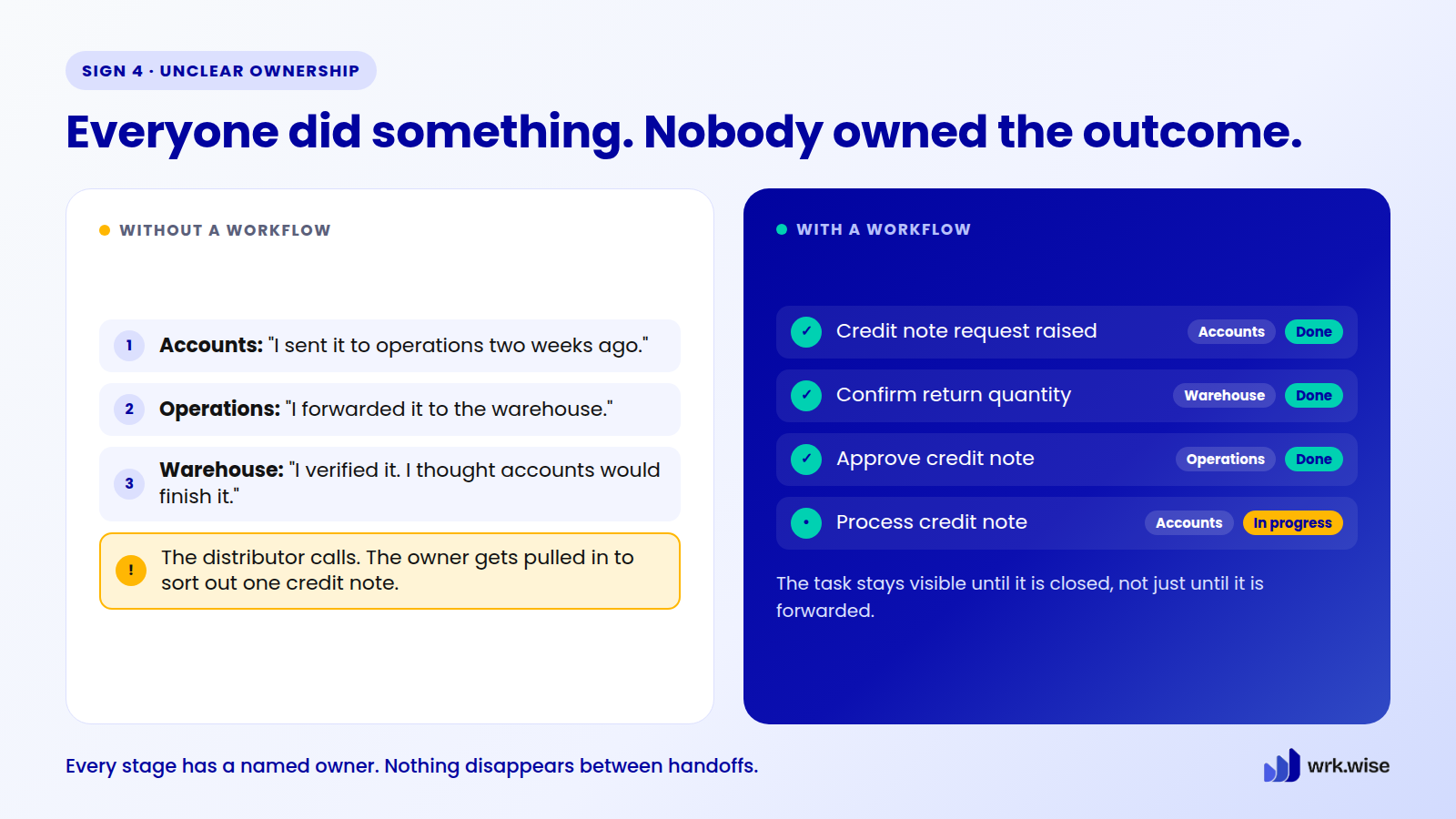
A regular distributor calls Swadmala Foods’ accounts executive. Why hasn’t his credit note been processed? She says she sent the request to the operations manager two weeks ago. The operations manager says he forwarded it to the warehouse to confirm the return quantity. The warehouse supervisor says he confirmed it days ago and assumed accounts would take it from there.
Everyone did something. Nobody owned the outcome. The distributor is annoyed, and Rajesh gets pulled in to sort out a single credit note.
Routine work at least has habits to fall back on. Unusual requests have nothing.
Two weeks before Diwali, a supermarket chain asks for a packaging change on an order already in production. The salesperson who took the call isn’t sure whose decision it is: hers, the production head’s, or Rajesh’s. The production head won’t stop the line without a sign-off. Rajesh is at a trade fair and checks messages only in the evening. For six hours, the request just sits. Nobody refuses it. Nobody owns it. By the time it reaches the right person, the team has lost half a production shift.
This is how many growing businesses really run: on habit and hierarchy. Everyone knows who handles a leave request or a routine payment. But when something falls outside the pattern, there is no default owner. That is when you find out how much of the “system” was really just memory and relationships.
Put a workflow behind both situations, and each one gets somewhere to land. The credit note has a named owner at every stage, so it stays visible until it is closed, not just until it is forwarded. Unusual requests go to a named decision-maker by type. For example, anything that touches both sales and production goes to one specific person by default. And when the owner is travelling, a named second-in-command for each type of decision means the business doesn’t pause.
The goal isn’t to remove judgment from unusual situations. It’s to make sure they reach someone who can use it.
5. Growth Creates More Chasing, Not More Control
Growth should make a business stronger. But in many companies, it creates more chasing.
More customers. More employees. More departments. Every step of growth adds more coordination, and at some point the business feels like it is growing and breaking at the same time.
For Swadmala Foods, the cracks showed up in onboarding. When the company had 45 people, HR managed it with a simple checklist and one WhatsApp message to each department head: “New joiner starting Monday. Please arrange desk, ID and induction.” Every department head knew HR personally and rarely dropped the ball.
At almost 70 people, the same message goes to more people who know HR less well.
A new warehouse hire arrives on day one with no ID card and no system login. The message went out, but nobody confirmed who would act on it. He spends his first morning waiting at the gate while HR makes three calls to find out who dropped it.
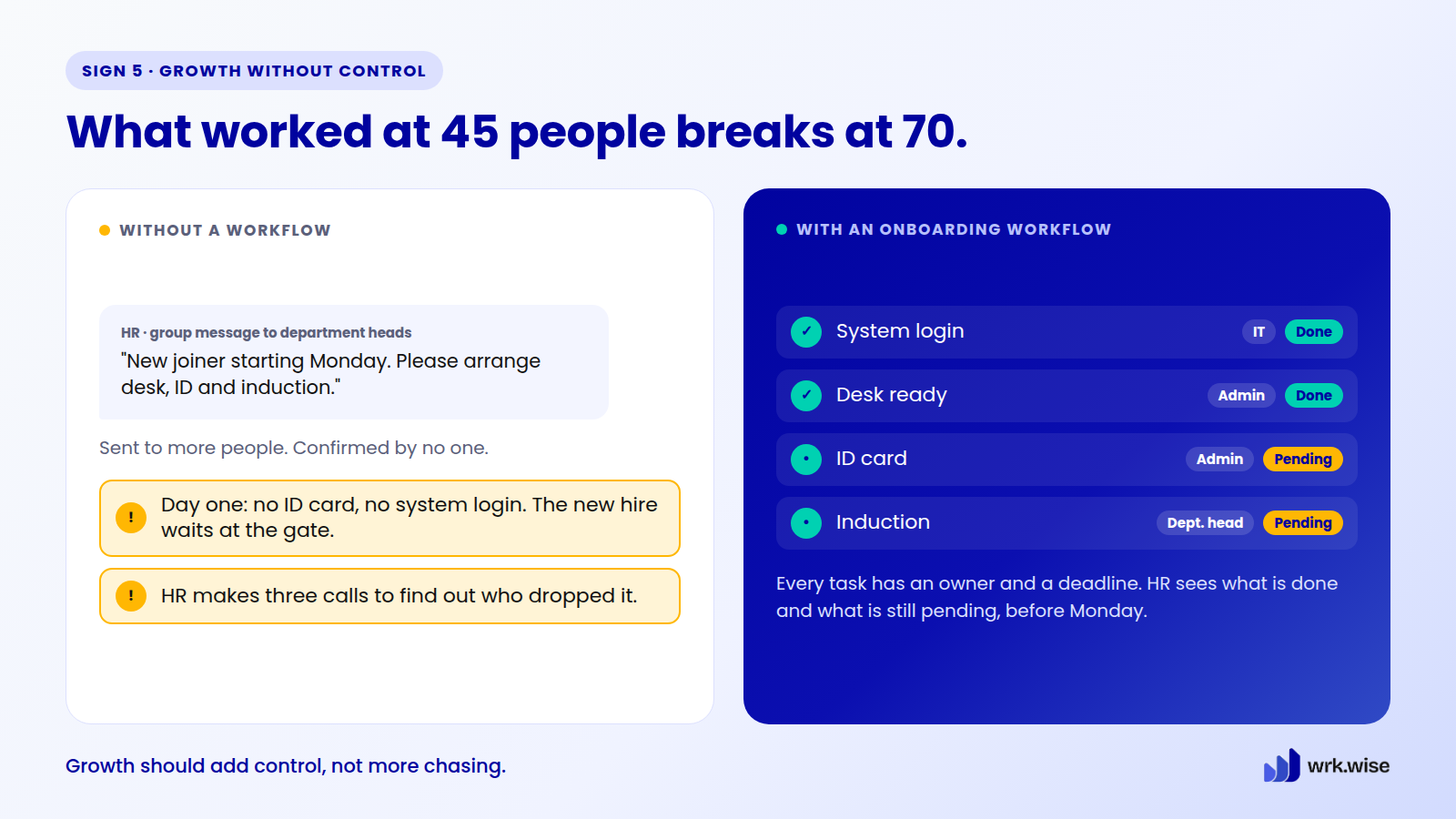
Put a workflow behind onboarding, and the gap closes. Every task has a named owner and a deadline: IT for system access, admin for the ID card, the department head for induction. HR sees in one place what is done and what is still pending, before Monday, not after the new hire is standing at the gate.
Final Thoughts: Busy Isn’t the Same as Moving
Go back to where we started. The team is busy. Everyone is working. Yet progress feels slow.
None of Swadmala Foods’ five problems came from lazy or careless people. They came from work that depended on memory, WhatsApp threads and one owner’s availability. That worked at 45 people. It doesn’t work at 70. Karan saw it early. Most businesses see it only after a distributor walks away.
When processes are manual, every new piece of work adds pressure on people. When processes are structured, the business can take on more without sliding into daily firefighting. Managers see progress without chasing it. Teams know what they own without asking. Owners stop getting pulled into every small issue.
That is the real meaning of Business on Autopilot. It doesn’t mean the business runs without leadership. It means the business no longer needs constant chasing to keep moving.
If one of these signs sounded familiar, start there. Pick the process that costs you the most time each week, and fix that one first.
Frequently Asked Questions
What is workflow automation?
Workflow automation turns repeated tasks, approvals, requests, reminders and handovers into a structured digital flow. Work moves from one step to the next without depending on manual follow-ups, paper forms or scattered messages.
How does workflow automation work?
You define the steps of a process, give each step an owner and a deadline, and set the rules for approvals and reminders. When a task or form is submitted, the workflow moves it through the right people and stages, and everyone involved can see where it stands.
What business processes can be automated?
Many everyday processes can be automated, including leave approvals, purchase approvals, payment reminders, document approvals, employee onboarding, daily reporting, compliance tasks, admin requests and vendor coordination.
How does workflow automation reduce human error?
It replaces memory and personal habits with clear steps, owners, deadlines and approval rules. Steps can’t be skipped quietly, and there is a record of who did what. That means fewer missed steps and less duplicated work.
How can workflow automation software help with approval processes?
It gives every approval a defined route. You can see who needs to approve, what is pending, where it is delayed and when it is done. This cuts down follow-ups and stops approvals from getting lost in email or chat.
Is workflow automation only for large companies?
No. Growing businesses often need it earlier than they expect. Manual processes that work fine at 30 or 40 people start to break as teams, customers and daily work expand.
Is Google Workspace enough for workflow automation?
Google Workspace is great for documents, spreadsheets, email and chat. It also offers some approval features, and tools like AppSheet can build simple workflow apps. But it doesn’t give most growing businesses a ready structure for step-by-step processes with clear owners, deadlines and a record of who did what. Teams often end up rebuilding that structure by hand in spreadsheets.
When is the right time to automate workflows?
When repetitive tasks, paper forms, manual data entry, approval delays or unclear ownership start slowing the business down. If growth is creating more chasing instead of more control, it is time.
Does workflow automation replace employees?
No. It removes repetitive work, manual follow-ups and process confusion, so people can focus on work that needs thinking, creativity, judgment and leadership.
How does wrk.wise help with workflow automation?
wrk.wise turns SOPs, consultant-built frameworks and everyday business processes into live workflows. Each step becomes a task with a clear owner. When one step is finished, the next one is assigned automatically. Managers can see progress and delays in real time, and requests such as deadline extensions or task reassignments go through a clear approval. The work people complete also feeds into their performance appraisals, so accountability is built into daily work, not added on at the end of the year.